Hardware recommendations
You need an aim device, plus a way to get your game feed to the second PC, for our products to work. A capture card is the recommended way and the only fully external one. Steam Relay is the free alternative, but it runs software on your gaming PC like every UDP-based 2PC setup, so it is unsafe by design. Make sure your setup meets the second PC requirements before purchasing a subscription. Prices shown are approximate and exclude shipping.
Most capture cards work. TipsyAim works with almost any capture card that Windows sees as a video device, USB or PCIe, not only the ones listed here. It picks the best format by itself (NV12, YUY2 or RGB) and converts the rest. Any card that captures 1080p will run, and 240 fps gives the fastest reaction. Set your gaming PC to 1080p or 1440p with HDR off. The cards below are the ones every build is tested on.
Elgato 4K X
249,99€excl. shippingExternal USB-C capture card. works with both PC and laptop, plug and play
Specifications
Pros
- Works with desktops and laptops
- Zero-lag 1080p 240fps NV12 capture
- Compact & portable
Cons
- More expensive
- Requires USB-C 3.2 Gen 2 port for full performance
AVerMedia GC573
179,99€excl. shippingInternal PCIe capture card. requires a second PC with a PCIe slot
Specifications
Pros
- Cheaper than Elgato 4K X
- 1080p 240fps NV12 capture
- Stable PCIe connection (no USB limits)
Cons
- Desktop PC only (needs free PCIe x4 slot)
Ferrum
129,99€excl. shippingUndetected aim device with hardware-level input. auto-connects with Tipsy Aim
Specifications
Pros
- Fully undetected by major anti-cheats
- Full passthrough: your real mouse stays on the main PC, hardware-isolated
- Supports multiple APIs (KMBox B+, B Pro, COM, Net)
Cons
- Often out of stock
- Most expensive option
MAKXD
~20,00€excl. shippingCurrently in development. coming soon
Specifications
Pros
- Affordable upcoming option
- Improved API and mouse movement expected
- Native Xbox Controller API integrated
Cons
- Not released yet
- No real-world data
Arduino Due
20,00€excl. shippingArduino board with custom firmware. works with Tipsy Aim
Specifications
Pros
- Custom firmware, no stock Arduino identity
- 32-bit ARM Cortex-M3 at 84 MHz, plenty of headroom
- Widely available, official and clone boards
Cons
- Custom firmware has to be flashed first
- Larger board than dedicated aim devices
MAKCU
18,99€excl. shippingSupported, but unsafe. works with Tipsy Aim at your own risk
Specifications
Pros
- Works with Tipsy Aim
- Affordable price point
- Widely available
Cons
- Firmware is well known to anti-cheats
- Default movement patterns are statistically recognizable
- Higher ban risk than Ferrum
KMBox B+
29,99€excl. shippingDetected aim device. unsupported due to active detection
Specifications
Pros
- Affordable
- Widely available
Cons
- Actively detected by anti-cheat
- Known hardware signatures flagged
- High ban risk
- Not supported by Tipsy Aim
KMBox Net
23,99€excl. shippingDetected aim device. unsupported due to active detection
Specifications
Pros
- Network-based connection
- Affordable
Cons
- Actively detected by anti-cheat
- Network signatures flagged
- High ban risk
- Not supported by Tipsy Aim
Second PC
The AI runs on your second PC. Nothing is installed on the PC you play on.
Minimum requirements
- Windows
- 10 or 11, 64-bit
- CPU
- Intel Core i5-1235U or better, with AVX2 support
- Graphics card
- Not required. A few CS2 models run on the GPU (any DirectX 12 card), and CS2 has CPU models as well.
- Capture
- A USB 3.2 Gen 2 (USB-C) port for the Elgato 4K X, a free PCIe x4 slot for the AVerMedia GC573, or Steam Relay over your network
- Gaming PC
- Nothing installed. It only sends its picture to the capture card over HDMI.
Inference speed
How long the AI takes to look at one frame, running on the CPU alone. Under 4.2 ms keeps up with 240 fps capture.
Both hold a stable 240 fps. Measured with TipsyAim's own benchmark and live app logs, 1080p 240 fps capture from an Elgato 4K X.
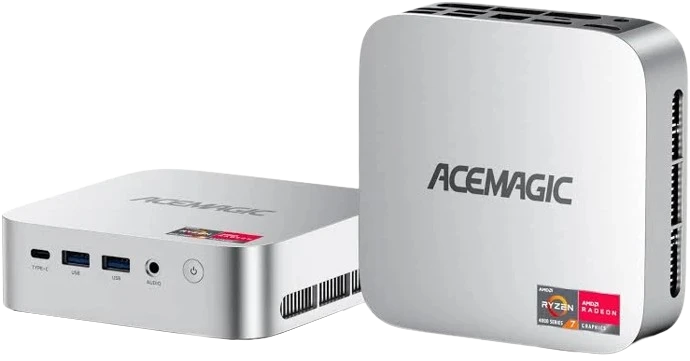
ACEMAGIC M1 Mini PC
Well above the i5-1235U minimum, small enough to sit next to your gaming PC.
AVX2 for the CPU models, integrated Radeon 680M graphics, and 2.5 Gbps Ethernet that suits Steam Relay too. Ships with Windows 11 Pro.
Good to know: the mini PC comes without a mouse, keyboard or monitor. You need a separate set of all three to operate it.
Have questions about hardware compatibility? and we'll help you choose the right setup.